Showing posts with label MX Security Appliance. Show all posts

Monday, April 25, 2016

Meraki Security Appliances just got Awesome...and Free

Cisco Meraki announced a new security feature at the end of March for firewall owners sporting Advanced Security licensing on their MX appliances - Advanced Malware Protection (AMP) now available in open beta.

Cisco's Advanced Malware Protection service is nothing new, but it is just now being extended to Meraki devices as an MX feature. The integration means Meraki now has access to AMP's global threat intelligence database - which includes over 500 million known files and adds another 1 million new malware samples every day.


What's more, AMP also features retrospective file analysis, reaching up to two weeks into the past and alerting you if any malicious files are discovered to have passed through your network in that time.

Free Gear and License
Meraki has historically made it pretty easy for IT professionals to test out their gear. First, by giving away an MR-18 access point for viewing any webinar on their website, and then last year expanding on that idea to also include a free 8-port, PoE switch for watching their "next generation of enterprise switching" webinar. In both cases, you also get a 3-year Enterprise license to go with your free hardware.

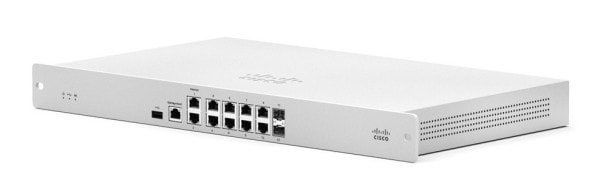
Meraki MX64 security appliance
Now, they have further expanded their array of freebies for IT pros to include the MX64 and 3-year Advanced Security license when you take in their "next generation of enterprise security" webinar. The three available time slots to sign up for the webinar quickly filled up at the beginning of the month, but if history is any indication, we hope to soon see this offer renewed in the future. The free switch was initially supposed to be a limited time deal that has since been left open indefinitely due to it's success. Though the MX webinars are full, you can sign up for the free switch here.

Meraki continues to develop and improve the feature sets of its product families at no additional cost to users. While many IT professionals balk at Meraki's recurring licensing model (Meraki devices don't function at all without purchasing a software license that eventually expires), the companies proven history in continuing to expand it's capabilities helps take the edge off. Also covered in those licensing costs is next day replacement and 24/7 access to Meraki's support. Regardless, IT pros have the chance to test out a Meraki solution for free, with no obligation to see if it makes sense for them.

Wednesday, November 11, 2015

Meraki's new hotness: blazing switches and another MX flavor

Cisco Meraki released their new line of cloud-managed, layer-3 switches this week in the MS350 series. This new family of switching can be physically stacked up to eight time for a total bandwidth of 160 Gbps. Management for both stand-alone and stacked deployments continues to be handled through Dashboard -- Meraki's cloud-based management interface. 


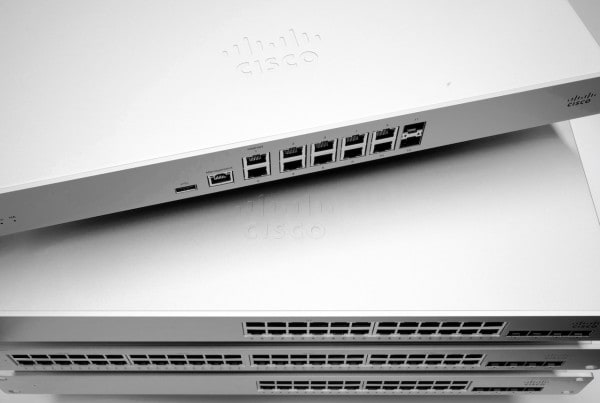
MX84 security appliance and new MS350 switches. Photo credit: cisco.meraki.com

As internet connections continue to grow faster, switching technology needs to keep up in order to deliver those increased speeds across the network. Additionally, network up-time is more important than ever before for most businesses. Both of these realities prompted Meraki to develop a switching solution that meets these growing needs and accommodates physical stacking in addition to virtual stacking already available in their MS320 line. With a CPU and memory upgrade, the 350 series supports higher device counts and the performance demands that come with them. The new line of switches includes 24 port and 48 port variants with and without power over ethernet. 

MX84 security appliance. Photo credit: cisco.meraki.com

Meraki also announced the MX84 - a 2x performance and capacity boost from the MX80 security appliance. On top of that, the port count is up, including two dedicated WAN ports, 8 ethernet ports, and the addition of two SFP ports for fiber. Furthermore, in an effort to better support dual-wan functionality, Meraki has also announced support for dual-active VPN connectivity and Intelligent WAN (IWAN) features. With Meraki IWAN, customers will be able to configure MX devices to support automatic policy-based and performance-based routing decisions, ensuring more demanding applications get the bandwith they require, and seamless fail-over if a VPN connection happens to be dropped. 

These releases from Meraki continue to illustrate the brand's ability to meet the demands of today's networking challenges in terms of hardware, while maintaining the ease of management software solution in Dashboard they are so well-known for.


Tuesday, July 22, 2014

Cisco Meraki Announces New MX Security Appliance Features

Hot on the heels of announcing new features for their MS switches, Cisco Meraki has just announced new functionality for their MX Security Appliances.  The new features will be distributed to existing MX users via Meraki's summer firmware update.

New MX Features include:

  • Datacenter failover
  • Warm spare failover
  • 1:Many NAT
  • Geo-based IP firewall rules

Build More Stable Networks

Datacenter failover is a new feature for Meraki's MX series that could be critical if you manage multiple branch sites that tunnel back to datacenters.  Branch tunneling is already available with the MX using AutoVPN, secure branch connections can be made through MXs set up elsewhere.  Now you can set up failover sites meaning you can specify which hub each branch will automatically failover to.

The Meraki MX can run in two different modes, NAT mode or Passthrough or VPN concentrator mode.  While running in NAT mode, the MX can now be configured with a warm spare failover function.  This means more stable networks; more uptime.

More Flexible Addressing

Cisco Meraki's MX line already supports 1:1 NAT (Network Address Translation) but with this update, they will now be capable of 1:Many NAT enabling mapping between any public IP and multiple unique internal IP addresses and ports.

Geographic Security

It is now possible to see the geographic location of the origin or destination of traffic on your network.  Because of this, it is now also possible to restrict traffic to and from certain locations.  If you want to keep all traffic from a certain country off your network or if you want all of your traffic to stay solely within US borders, you can easily make those modifications.

Cisco Meraki continues to improve their network solutions.  We will have more on these upgrades and improvements in the future.  For more information, visit us at CopperWifi.com.